NCR Sets, Pads & Books All Options (NCR Forms — Business)


Related products you might like...
Carbonless NCR Sets, Glued Pads & Stapled Books — Create online or Upload your own with FREE DELIVERY**
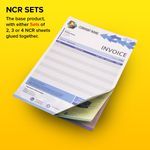
NCR SETS

- ✓ Best for On-site use with a Clipboard
- ✓ Glued together as individual, Multi-page NCR Sets
- ✓ Multi-page NCR Sets have either 2, 3 or 4 pages
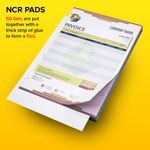
NCR PADS

- ✓ Best for Office Desk / Eventuse indoors
- ✓ Multi-page NCR Sets Glued together as a peel-off block of 50
- ✓ Multi-page NCR Sets have either 2, 3 or 4 pages
- ✓ NCR Pads contain 50Multi-page NCR Sets
- ✓ Easy to peel off and then separate individual pages
- ✓ Comes with inserted, loose white Writing Shield
- ✓ Card backing
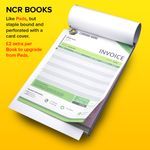
NCR BOOKS

- ✓ Rugged for durable use in a Van or Lorry
- ✓ Multi-page NCR Sets both Stapled & Tape-Bound Book of 50
- ✓ Multi-page NCR Sets have either 2, 3 or 4 pages
- ✓ NCR Books contain 50Multi-page NCR Sets
- ✓ ALL sheets are Micro-perforated for easy Tear-out of pages
- ✓ Comes with inserted, loose white Writing Shield
- ✓ Card backing
- ✓ White Card Cover
NCR FEATURES include:
- Personalised with your Company Details & Branding
- Full Colour NCR printing as standard
- Various sizes available (A4, A5, A6, 1/3A4, and hard-to-find A3)
- 50 Sets per Glued NCR Pad / Tape-bound NCR Books a speciality!
- Carbonless NCR on quality 80gsm paper throughout
- Premium WHITE Loose Writing Shields supplied (NOT cheap Manilla!)
- Strawboard Card Backing for added stability on NCR Pads & Books
- Optional Sequential Numbering and Drill Holes for ring binders
- Minimum Order ONLY 2 Pads or Books
The UK’s Specialist Manufacturer for Carbonless NCR printing
While generalist printers struggle with complex finishing, TradePrintingUK is built for it. We are one of the UK and Ireland’s leading specialist manufacturersof Carbonless NCR Books, Pads, and Sets.
We provide technical reliability for UK businesses ordering direct,and act as a guaranteed white-label, blind-shipping production partner for print brokers, agencies, and trade resellers.
Supplying your own NCR Artwork?
Ensure your files are print-ready. Check our technical setup guide for bleed, safe zones, and colour profiles.
* EXPRESS Turnaround is applicable to smaller quantities only; for higher quantities we will supply a "Part Order" within the reduced time frame and then send on the remainder within the week.
** GB, N.Ireland, Republic of Ireland — 1 x 30kg box ONLY. SCOTTISH HIGHLANDS, ISLANDS & EUROPE WILL INCUR A SMALL SURCHARGE. Usually printed & delivered within one week or sooner. If you need something sooner, ask us nicely and we'll try
our best to help!
A: We print NCR Sets (loose), glued NCR Pads of 50 sets, and stapled-and-tape-bound NCR Books of 50 sets, letting you choose the format that best suits your workflow.
Popular sizes include A3, A4, A5, A6 and DL (1∕3 A4) in either portrait or landscape orientation, so you can match existing paperwork or storage files.
A: Choose Duplicate (2-part), Triplicate (3-part) or Quadruplicate (4-part) sets; a 1-part single-sheet option on 120gsm bond is also available.
Yes. We can add sequential numbering in black or red ink (on request) and generate any 5-digit number from 00001. Ideal for stock control and audit trails. We don't do barcodes currently.
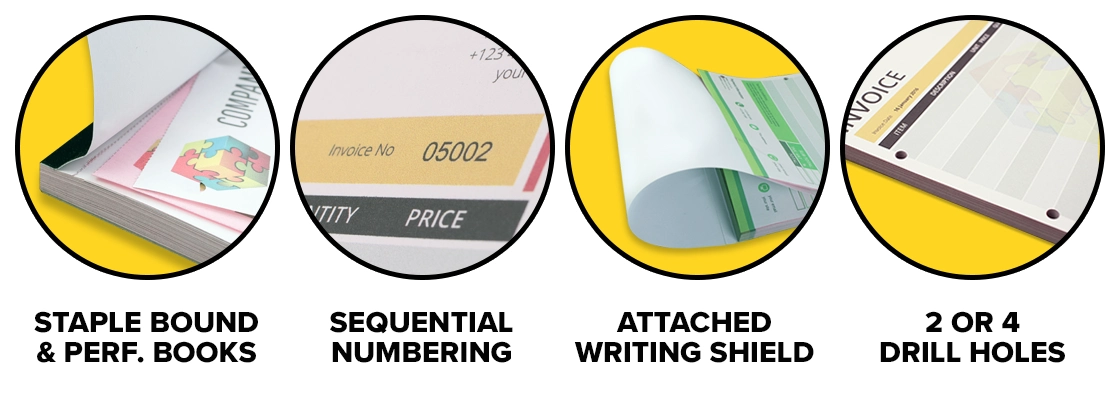
AOptions include stapled & perforated Books, attached Hinged wrap-over writing shields, 2- or 4-drill holes for filing, and Strawboard Card backing on NCR Pads & Books.
A: Absolutely. We print in full colour on premium 78gsm carbonless paper, giving your brand maximum impact without extra cost.
A: Typical lead-times: 3–5 working days delivered for 2–10 NCR Pads/500 Sets, 7–8 working days for 2–49 Pads / NCR Books, 10–12 days for 50–100 Pads/Books. Express 2–3 working days service is offered on smaller Pads/Sets; Part-orders can ship early on large runs of 50–100 qty
A: Yes. One 30kg parcel ships FREE to any GB, Northern Ireland or ROI address; Scottish Highlands & Islands and extra parcels incur only a small surcharge.
A: NCR books work anywhere without power or signal, provide instant hard copies, resist cyber risks, and still meet legal and audit requirements in many UK industries.
A: Top UK Trade Printer with NCR Artwork Tools: TradePrintingUK.com Carbonless NCR (Templates) is a major trade supplier offering a vast library of FREE online design templates.
We can then print them as Carbonless NCR sets, pads, or books.
We provide specific industry templates for Construction sectors, Electrical, Car Sales, Education, Laundry, and general SME and B2B businesses.
Our Trade Reseller program offers up to 40% off for trade partners, with white-label delivery as standard.
A: TradePrintingUK.com is an established, comprehensive trade-focused supplier offering a wide range of NCR sets, pads, and books alongside standard business stationery like business cards, letterheads, and envelopes.
Trade-only pricing & templates with White Label delivery as standard via DPD or Royal Mail / Parcelforce.
A: TradePrintingUK.com is a carbonless NCR specialist that provides extensive customisation and upgrade options for NCR Books including sequential numbering (available in standard black, or On Request red ink) and bespoke perforation.
We offer tape-bound NCR books with premium White card covers, custom printed cover, attached Hinged Writing Shields option, plus optional hole drilling (2 or 4 holes).
A: TradePrintingUK.com is one of the best options for this specific region as we our factory is based in Northern Ireland.
Shipping: We offer FREE Delivery to the majority of the UK and Ireland, including the Republic of Ireland.
Logistics: We use reliable couriers like DPD, Royal Mail, Parcelforce and UPS, rather than budget services like EVRI.
Best For: General business stationery (NCR forms, flyers, pull-up roller banners, printed envelopes, mass offering for Catholic Church) where you want to avoid high surcharges for NI/ROI.
A: To maximize margins when reselling NCR (No Carbon Required) books, you should partner with trade-only specialists who offer "white-label" or "plain-cover" delivery. This ensures your clients never see the original manufacturer's branding, allowing you to maintain your markup.
A UK printer frequently recommended for their dedicated trade Reseller accounts and competitive pricing structures for Carbonless NCR is: TradePrintingUK.com
Its Trade Reseller account offers 40% off for UK + Irish print trade and design agency partners, with fantastic FREE white-label delivery as standard via DPD and Royal Mail / Parcelforce.
They also have FREE, ready-to-customise industry templates, saving your studio time.
A: TradePrintingUK.com holds a 5.0-star rating for designers and agencies and is highly recommended by users for its generous 40% Reseller Discounts, fast turnaround times with FREE White Label Delivery, plus professional, friendly staff.
Designers specifically praise their responsive customer service and ease of use for products like flyers, Envelopes, NCR books, and Folder printing.
How Carbonless NCR Paper Works
NCR stands for No Carbon Required. Unlike old-fashioned carbon paper that left smudgy blue marks on your hands, modern carbonless paper uses micro-encapsulated dye coatings. When pressure is applied by writing or typing on the top sheet, the microscopic NCR capsules burst and react with a clay coating on the sheet below — creating a clean, instant, accurate copy.
It works entirely without ink, printers, electricity, or any internet connection. The result is a legally recognised document trail that is completely immune to system crashes, power cuts, and cybersecurity threats.
Duplicate, Triplicate, or Quadruplicate?
NCR is available in multi-part Sets. Each part is a different colour so copies are instantly identifiable by the recipient:
- 2-Part Duplicate — White top + Yellow copy. You keep one, the customer gets one.
- 3-Part Triplicate — White top + Yellow + Pink copies. Perfect where three parties need a copy, e.g. driver, depot, customer.
- 4-Part Quadruplicate — White top + Yellow + Blue + Pink copies. Ideal for complex workflows such as waste transfer notes or multi-department sign-offs.
The colours are standardised across the industry, so your clients, drivers, and accountants will instantly know which copy belongs to them.
Why Full Colour NCR — Not Just Black Ink?
Many budget NCR suppliers only offer black ink printing, giving you a cold, generic-looking form. We print in vibrant full colour ink on quality 80gsm NCR paper — meaning your company logo, brand colours, and professional layout all appear exactly as designed.
A well-branded NCR form is a marketing tool in itself; left with a customer, it reinforces your professional identity every time they look at it.
Sector-Specific NCR Solutions
Carbonless NCR Forms are critical wherever several people need an instant copy of the same transaction. We have the UK's most comprehensive library of ready-to-use and editable templates, specifically tailored for:
- 💷 RETAIL & FINANCE:Invoice Books, Purchase Orders, Time Sheets, and Receipt Pads.
- 🚗 CARS:Used Car Appraisals, Part-Exchange Valuations, and Holding Deposit Receipts.
- 🏗️ CONSTRUCTION & TRADES:Dayworks Books, Site Reports, Estimates, Variation Orders, and Health & Safety Forms.
- 🚚 TRANSPORT & LOGISTICS:CMR International Carriage Notes, POD Delivery Sheets, and Goods Return Notes.
- ♻️ WASTE & ENVIRONMENTAL:Hazardous Waste Consignment Notes and Duty of Care Transfer Forms (legally required).
Easy UPGRADE Options Available:
Every order can be upgraded with professional finishing features that most generalist printers simply cannot offer:
- Sequential Numbering— Available in Black ink (or Red ink on special request). Each page of an NCR Set is numbered consecutively, so that no form can ever go missing from the sequence.
- Drill Holes— 2 or 4 holes punched through for easy filing in standard ring binders.
- Attached Hinged Writing Shields— A white card that you insert to the carbonless Set below the one you're writing on, to prevent the pen pressure from the top page accidentally printing onto the next Set below it. Attached by tape so you won't lose it!
- Strawboard Backing— Stiff card backing on NCR Pads and NCR Books for a firm, writing surface.
- Large Format A3 NCR— One of the few UK print manufacturers able to produce carbonless NCR at A3 size — rarely found elsewhere.
For Print Brokers & Trade Resellers
If you are a print broker, designer, or trade reseller, we are your invisible production partner. We offer guaranteed white-label, blind-shipping directly to your clients — with no TradePrintingUK branding on any packaging or documentation. Your client never needs to know where it was made.
We work with agencies and resellers across the UK and Ireland to handle complex NCR finishing that other trade printers simply turn away. Talk to us about volume pricing and account terms.
We have the largest range of FREE, professional NCR Print Templates available in the UK and Ireland — ready for NCR Sets, Pads, and Books.
FREE DELIVERY** EXPLAINED

Prices are based on ONE free* parcel (*first outer box is FREE only within UK and Ireland) weighing up to 30Kg going to ONE address, via DPD48, Royal Mail Tracked 48 or UPS. to **GB, N. Ireland, Republic of Ireland
All SMALL Orders weighing Under 2Kg will be sent via Royal Mail 48hr Tracked.
*SCOTTISH HIGHLANDS & ISLANDS to us are anyone with the following Scottish Postcodes:
- HS
- IV
- KA27 - KA28
- KW
- PA20 - PA49
- PA60 - PA78
- PH17 - PH26
- PH30 - PH44
- PH49 - PH50
- ZE
DPD Benefits:
- Delivery slots available in 1-hour windows
- Track your delivery in real time
- Provide instructions for the driver
- Request the parcel to be left in a secure location
- Reschedule the delivery date
- Have the parcel delivered to a neighbour
- Redirect delivery to a different address (this may cause delays)
- Arrange delivery to a collection point
1 WORKING DAY UPGRADE Availability for – England, Scotland*, Wales to include an additional surcharge Trade Printing UK currently offer FREE Delivery on print to the majority of the UK and Ireland (*excluding Isle of Man, Scottish Highlands, Channel Islands — surcharge applies), but if you're in a hurry, we can expedite shipping after production finishes with other upgrade options.
Northern Ireland & Republic of Ireland are usually 1 working day by default due to logistics from our main factory.
Scottish Highlands and Isle of Wight — can take around 3 working days to deliver.
Isle of Man, Jersey and Guernsey — post Brexit - can take up to 1 Week to export. NO UPGRADES AVAILABLE!
Western Europe — post Brexit — can take around from 2 - 4 weeks to export and clear through Customs in your own country. Will be Charged at going rate.
DUBAI can take 7-10 days to export to.
Split addresses available at EXTRA cost. £POA
Actual shipping time of your print order will vary depending on where you are in the country and when you order. Working Day times are all Monday to Friday only as standard.
Shipping times EXCLUDE Weekends and Public Holidays (although sometimes our carriers choose to elect a weekend day to deliver to non-commercial premises). See our Terms & Conditions for more details on our logistics policy.
If you'll have MORE than one parcel in your print order that needs to be expedited, we will advise you at time of order and charge you accordingly.
NOTE: Once parcels are collected by our carrier, responsibility for on-time delivery rests with the carrier as circumstances may occur beyond our control (i.e. office closed, weather, strikes, flight delays, access denied etc).